Hi guys,
A big update was rolled out on WPBay today, this is probably the biggest functionality update I made this year so far.
I added support for product plans on WPBay. This means you can now create different plan levels for the same product, not only different prices/license counts.
Until now, most products were basically handled with the default internal plan, which was called wpbay in the API/SDK. This still exists and it will continue to work. So nothing breaks for existing products.
But from now on, products can also have plans like:
basic
pro
agency
or whatever plan names make sense for the product.
You can add new plans, from the ‘Pricing’ tab of your Edit Product menu:
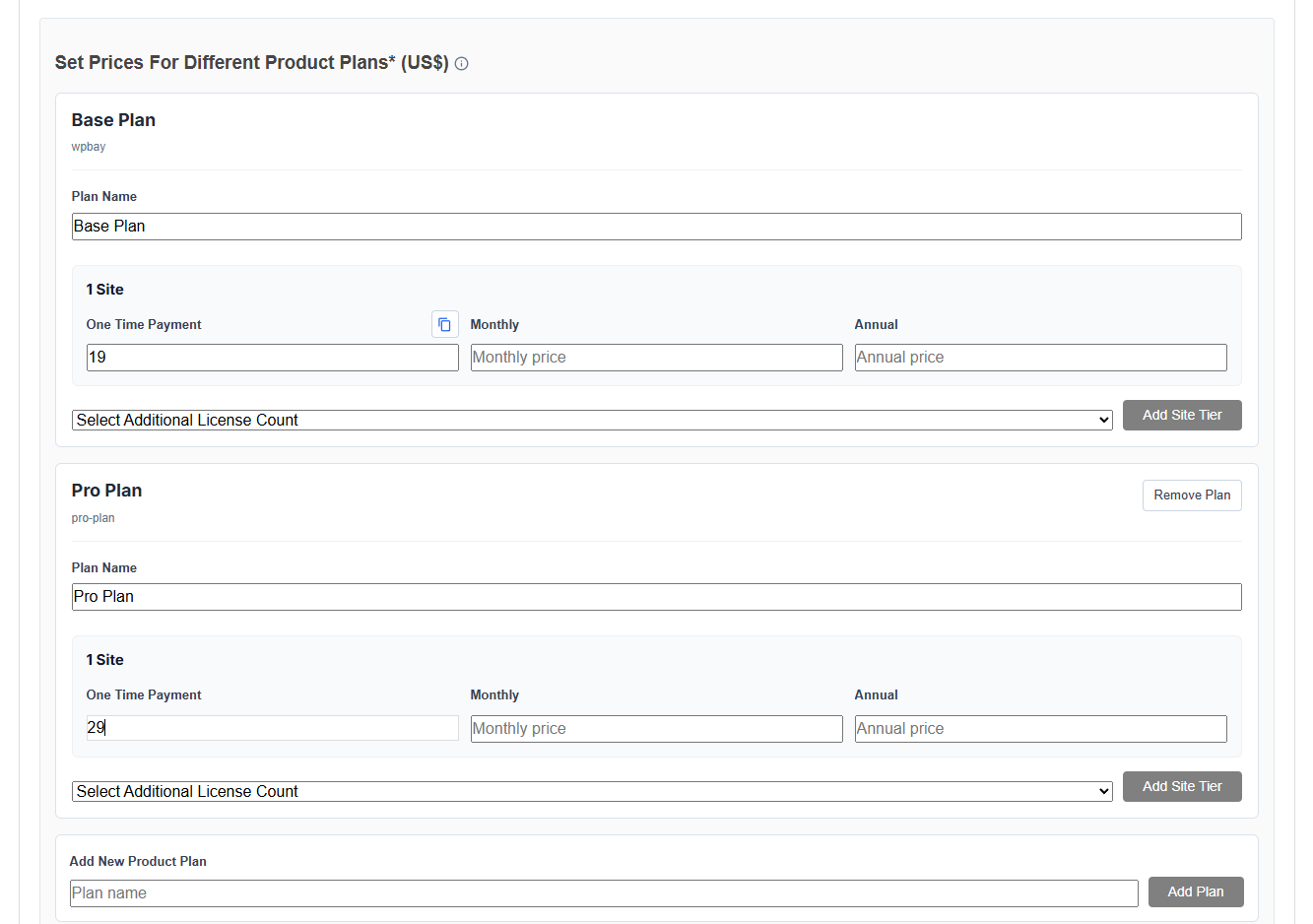
Add new product plans using the ‘Add Plan’ button, after you added a name for it.
With this feature, for example, a plugin seller can now do something like:
Basic plan: simple features available in the plugin
Pro plan: more features
Agency plan: all features, with this, you can combine, for example, also unlimited license options for customers
This opens the door for much better pricing setups on WPBay, especially for plugin ideas where you would need feature-gating.
The important part: the plan is not something buyers or sellers need to manually send through the API. WPBay detects the plan from the purchased variation / purchase code.
So when a customer activates a license, WPBay now stores and returns the plan type connected to that purchase.
Example response:
{
  "success": true,
  "plan_type": "pro",
  "message": "License successfully registered."
}
For products which don’t use custom plans, the default internal value remains:
wpbay
This is kept for backwards compatibility. So old integrations, old products and old licenses will keep working.
I also updated the WPBay API so the plan type is returned in the important license endpoints, like registration, verification and registration check.
This means custom integrations can now read the plan and unlock features based on it.
Example:
{
  "order_id": 1234,
  "product_id": 910,
  "product_title": "Your Product",
  "max_license_count": "1",
  "plan_type": "pro",
  "order_status": "completed"
}
I also updated the SDK side.
The SDK now has these helper methods:
$sdk_instance->get_plan_type();
$sdk_instance->get_plan();
$sdk_instance->is_plan( 'pro' );
get_plan_type() returns the current active plan slug.
get_plan() is just a shorter alias.
is_plan() is used when you want to check directly if the user has a specific plan.
Example:
$sdk_instance = my_wpbay_sdk();

if ( $sdk_instance && $sdk_instance->is_plan( 'pro' ) ) {
    echo 'Show Pro feature here.';
}
Or, if you want to allow both Pro and Agency:
$sdk_instance = my_wpbay_sdk();

if (
    $sdk_instance &&
    (
        $sdk_instance->is_plan( 'pro' ) ||
        $sdk_instance->is_plan( 'agency' )
    )
) {
    echo 'Show premium feature here.';
}
You can also read the current plan directly:
$sdk_instance = my_wpbay_sdk();

if ( $sdk_instance ) {
    $current_plan = $sdk_instance->get_plan_type();

    echo 'Current plan: ' . esc_html( $current_plan );
}
Very important: sellers should not add plan_type manually to the SDK config.
So this is not needed:
'plan_type' => 'pro'
The SDK should not be configured like that. WPBay detects the plan from the license itself.
The normal SDK config stays the same:
$sdk_params = array(
    'api_key'          => 'YOUR_API_KEY',
    'wpbay_product_id' => 'YOUR_PRODUCT_ID',
    'product_file'     => __FILE__,
    'is_free'          => false,
    'is_upgradable'    => false,
);
Then after activation, the SDK knows what plan the customer has.
The upgrade form was also adjusted around this idea. For free products with upgrade options, sellers can use the upgrade form to show available paid options / plan options for that product.
This will make WPBay much more flexible for sellers who want to offer a proper pricing table instead of only one generic license.
I also updated the API documentation and SDK documentation to explain this clearly, because I know this can get confusing fast if the difference between license count and plan type is not clear.
In short:
plan_type = what feature plan the customer bought
max_license_count = how many sites the customer can activate
wpbay = the default internal plan for products without custom plans
Developer/sandbox licenses currently use the default plan type:
wpbay
This is intentional, because sandbox testing should stay simple for now.
For existing sellers: no action is required if you don’t want to use product plans. Your existing products continue to work as before.
For sellers who want more serious pricing setups, this will be useful. You can now structure products more like:
Basic / Pro / Agency
Starter / Business / Developer
Single Site / 3 Sites / Unlimited
Free / Premium / Lifetime
I think this feature will make WPBay more suitable for real plugin businesses, not just single-price downloads.
Also, note that if you add a new plan to your products without actually implementing the code for checking it in your plugin/theme (using the WPBay API or WPBay SDK), the plans will be invisible for your products and they cannot use them fully. So, if you want to use the new product plans feature, it is recommended to check plans using the SDK or the API from inside your product.
If you don’t want to use the plans feature, no problem, WPBay will continue to work for you ask before.
I’ll continue improving the seller experience around plans, pricing and upgrades. Feedback is welcome, especially from plugin/theme authors who already have tiered products and have an idea of what is still missing from WPBay.
I created and published also an example plugin which uses plugin plans (using the WPBay SDK), check how its sales page looks: https://wpbay.com/product/local-booking-pro/
Thank and cheers!
*Video update: https://www.youtube.com/watch?v=xXVp_szWNCY
