October 22, 2026 – Major progress in patch availability for hosting providers and WordPress websites.
Following the emergency PHP security releases addressing CVE-2026-109618 and CVE-2026-109619, CloudLinux has completed a major rollout of patched PHP packages, including support for older PHP versions still widely used in shared hosting environments.
Here’s a consolidated summary of the developments from October 21–22.
CloudLinux Patch Rollout Completed
According to CloudLinux’s latest incident updates, its Alt-PHP security patch rollout for CloudLinux OS 7, 8 and 9 was completed on October 22 at 00:07 UTC, with confirmation published at 01:19 UTC.
Patched packages are now available through the regular stable repositories for PHP 5.2–5.6, 7.0–7.4 and 8.0–8.5.
Other confirmed developments include:
-
cPanel EasyApache 4: Patched ea-php packages covering PHP 5.2 through 8.5 became available on October 21 at 20:55 UTC.
-
CloudLinux 7, 8 and 9: Patched Alt-PHP packages were initially available through a separate ELS repository but have since reached the regular stable repositories.
-
CloudLinux 10: Patched Alt-PHP 5.2 is available in stable, while other affected branches are available through the ELS ALT PHP repository.
-
CloudLinux OS for Ubuntu 22.04: Patched Alt-PHP packages are available through its stable repository.
-
Native PHP: CloudLinux confirmed patched PHP 8.2 and 8.3 packages for CloudLinux 9, and PHP 8.2 for CloudLinux 8, on October 21 at 22:30 UTC.
An earlier CloudLinux announcement incorrectly stated that certain Alt-PHP packages were available in standard repositories when they had actually been released to TuxCare ELS. This was corrected, and the subsequent rollout has resolved that availability gap for CloudLinux 7, 8 and 9.
How Hosting Administrators Can Update
CloudLinux administrators can update their Alt-PHP packages using the appropriate package manager.
CloudLinux 7:
yum clean all && yum update "alt-php*"
CloudLinux 8 and 9:
dnf clean all && dnf upgrade "alt-php*"
CloudLinux 10 administrators should verify the appropriate stable or ELS repository for their PHP branch before upgrading.
After applying updates, restart the relevant PHP-FPM, Apache or LiteSpeed workers and verify that the patched packages are actually serving requests.
Important: CloudLinux warned that security advisory metadata was not yet available for these updates. Commands relying exclusively on yum --security might therefore miss the fixes. A normal package update is recommended.
Older PHP Versions May Still Display the Same Version Number
CloudLinux and other long-term-support vendors can backport security fixes into older PHP branches without changing their upstream version numbers.
For example, a vendor-patched PHP 8.3.35 build may already contain both PHP2Shell fixes.
This means administrators should verify package revisions, vendor advisories and changelogs, rather than relying solely on the PHP version displayed in WordPress Site Health.
For standard upstream PHP installations, the fixed versions remain:
-
PHP 8.5.12
-
PHP 8.4.27
-
PHP 8.3.36
-
PHP 8.2.35
Additional WAF Protections
CloudLinux confirmed that Imunify360 WAF ruleset 8.85 was deployed on October 21 at 17:17 UTC, providing additional protection against known exploit variants.
Cloudflare has also deployed emergency protections against PHP2Shell attack vectors.
However, WAF rules are not complete protection against vulnerabilities in the PHP interpreter. Installing patched PHP packages remains essential.
Authorities Recommend Isolating Unpatched Systems
The US National Security Agency has issued an advisory recommending that organizations unable to apply security updates immediately consider taking affected systems offline until they can be secured.
This is particularly important for exposed systems handling customer information, payment-related operations or sensitive credentials.
Are Attacks Still Happening?
Patchstack previously reported active exploitation attempts from hosting partners.
Its October 21 telemetry update at 13:57 UTC reported probing activity without hard evidence of successful breaches in its dataset.
This does not mean no websites have been compromised. Confirmed exploitation techniques exist, and administrators should review their logs for suspicious requests or abnormal PHP behavior.
What WordPress Administrators Should Do
If your website is hosted on CloudLinux, contact your hosting provider and confirm that the appropriate security packages have been installed.
Administrators managing their own servers should update PHP, verify that the correct packages are active, and restart PHP workers where necessary.
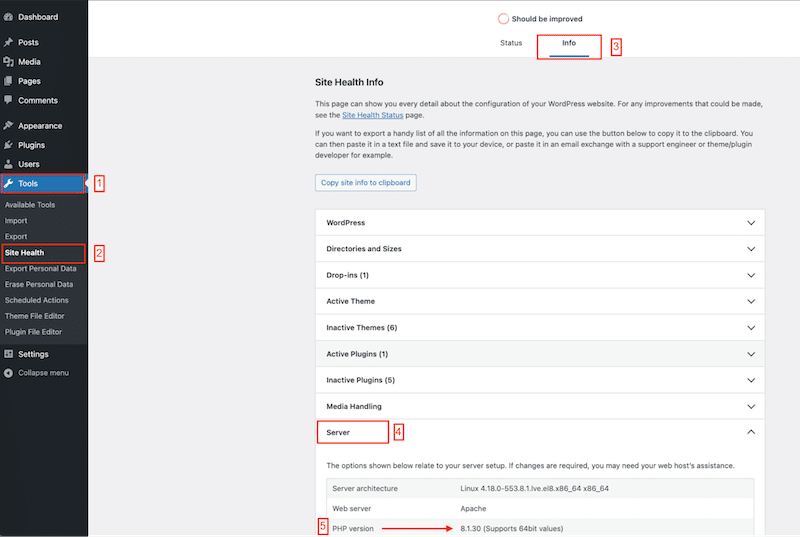
Check your PHP version through WordPress Dashboard → Tools → Site Health → Info → Server. For vendor-patched older PHP releases, ask your provider to confirm that both CVEs have been addressed.
Remember that updating WordPress, WooCommerce, themes or plugins does not fix PHP2Shell.
The good news is that security patches are now available across significantly more hosting environments. The important remaining step is ensuring that hosting providers have actually deployed them.
We’ll continue following any significant developments.
Official sources:
CloudLinux Incident Timeline
CloudLinux Technical Advisory
PHP Official Security Advisory
Patchstack Live Incident Report
NSA Security Advisory