I just noticed that if I have a cleared cache wpbay.com loads really slow it take 4-5 seconds on a really strong internet, I am sure it can be improved! After that is ok the cache takes over and is fast.
Hello,
You’re right, the first uncached load is slower. On my side I’m seeing around 2-3s on a fresh load in incognito, but I agree it can be improved further and I’m already looking into optimizing the initial request.
When you got 4-5s, probably the server side cache was rebuilding itself, or your user account cache was regenerated (if you were logged in when you tested, your user account cache takes a bit of time to be created).
I did some perf testing, looks ok-ish on the first run, but will try to improve it:
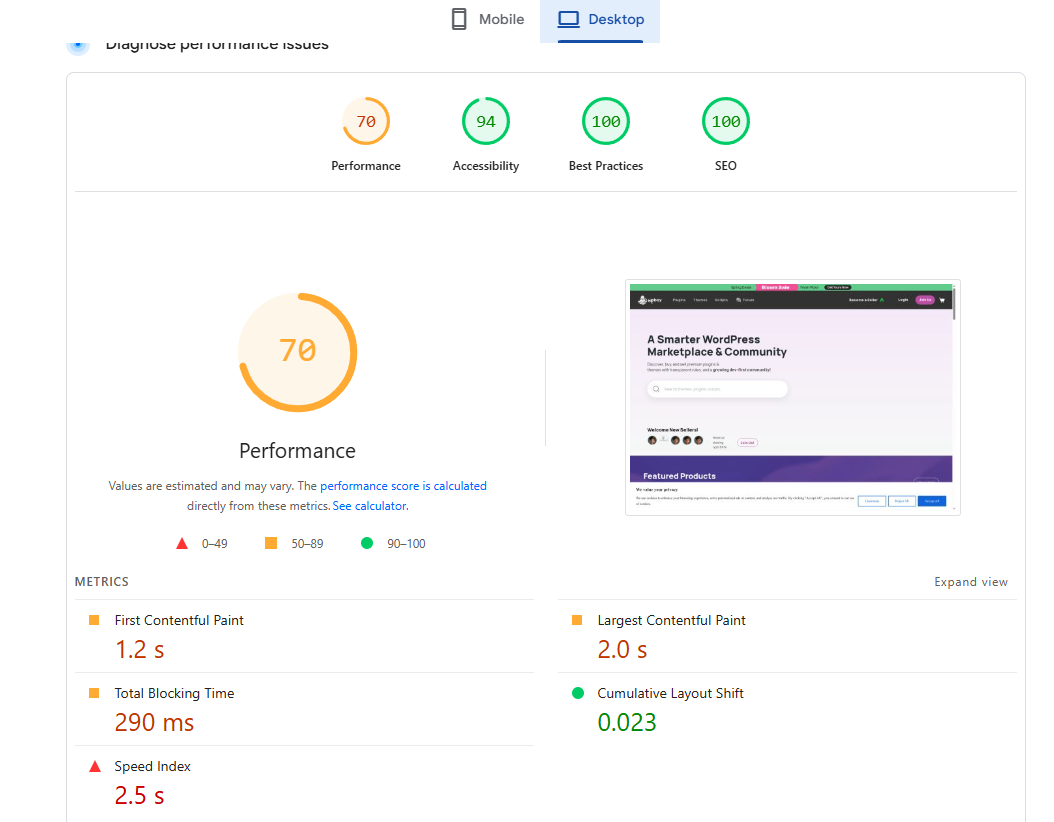
If you notice specific pages that are slower than others, let me know, that would help a lot.
I did not test other pages but the home page loads really slow sometimes I have to look if it is connecting. 4-5 sec for me.
I tested a couple of times again and I also got 4-5 sec load time in some cases… weird. I look into it. Probably something with caching.
You are logged in when testing, right?
It does not matter whether I am logged in or not. The issue happens when the browser cache is cleared, such as when a user visits for the first time. After that, the cache works properly and takes over. So the issue is not the cache itself, but the actual page. We need to look at what can be optimized.
One thing I have in mind is to manually minify the JS and CSS files. It is not the same as when the cache plugin does it, because the first time the page loads there is still a delay. Another thing and this will make the biggest difference is to review the JS files being added to the homepage. I am sure there are some JS files there that should not be there. It happened to me as well on my site, form plugins that are adding the js and css file everywhere including on pages where they shuld not be there…
Yup, will check on these and do some experiments, thanks for highlighting them.
1 Like
Welcome! I am sure thare are other small things that can be done but this two are the ones the came to my mind and had issues on my side…
1 Like
I am experimenting with some new caching mechanism, check if it made any speed difference on your side.
1 Like
I t hink is perfect almost instantly loads, I can see the page and than the images are loading sequentially is good!
Great, I also follow things, I hope it does not break any checkout/cart part, tested so far and works.
1 Like
What I nothiced is that imagea are laoding as I scroll down maybe is best to set it to load secuentially so if the user stays at the top fot he page the images loads anyway and appear before scroll but after the page is painted/render.
I check on this, not sure if possible, but I see.
The loading time is good but the issue now is that when scrolling the iamges load appear only when on screen it dose nto look good.
I think the way it was before it loaded everything before rendering the page, the way it shuldbe is to show the page as soon as the document is ready and thanload the rest sequentially so theimages will be ready before the user scrolls and have good loadgin times as well, hope it makes sense.
I haven’t changed anything on the image loading part, this was the way how it was from the start.
I mingled on database caching level only.
But I think on image loading, to see what can be done.
1 Like
I tried again today with a clear cache and the same long loading time is happening, sorry for the bad news  I hope you can find a way to fix this specially on the home page the rest can be a bit slower but the hompoage shuld load in maximum 1sec…
I got a report from a new WPBay user that sign up was not working, I had to disable the caching layer I added to fix this issue and to make sign up work again…
So, I need to do some tweaks to the system again, to see where I can trim some milliseconds of load time. I will try to cover also your initial suggestions regarding this.
There are about 66 JavaScript files loading on the page, which is far too many. Many of them are related to WooCommerce, but this can definitely be improved. For comparison, on my page I only load six JavaScript files, and I use WooCommerce as well.
That’s the main issue: too many JS requests, along with CSS files. The images are already optimized since they load after the page is displayed, but these HTTP files must all load before the page can fully render, this is kinda solved with th eexception that the images should load even if they are not displayed on the page after the page displays.
The only real solution is to remove any unnecessary files. Caching alone won’t solve the problem because, on the first page load, all these JavaScript files still need to be fetched regardless of how the cache plugin is configured.
If possible, combining these files into a single file would help. Your cache plugin might have a feature that allows you to do this… this woiuld improve a lot but all those js files Ibet they are big combined if it takes so long to load.
Yup, reducing page load size is the best solution. Will be checking on this.
1 Like
More page load speed tweaks were done today, I will test if I did not break something during this process…
Seams to be much faster, I will test more in the comming days and let you know, right now it loads fast .